Take your time back from the apps that eat it.
Choose the apps you want to use less and set your own limits. When the time is up, Social Break closes the app and shows you the goal you said comes first.
Free. Android phone, browser and Windows computer, one limit across all three.
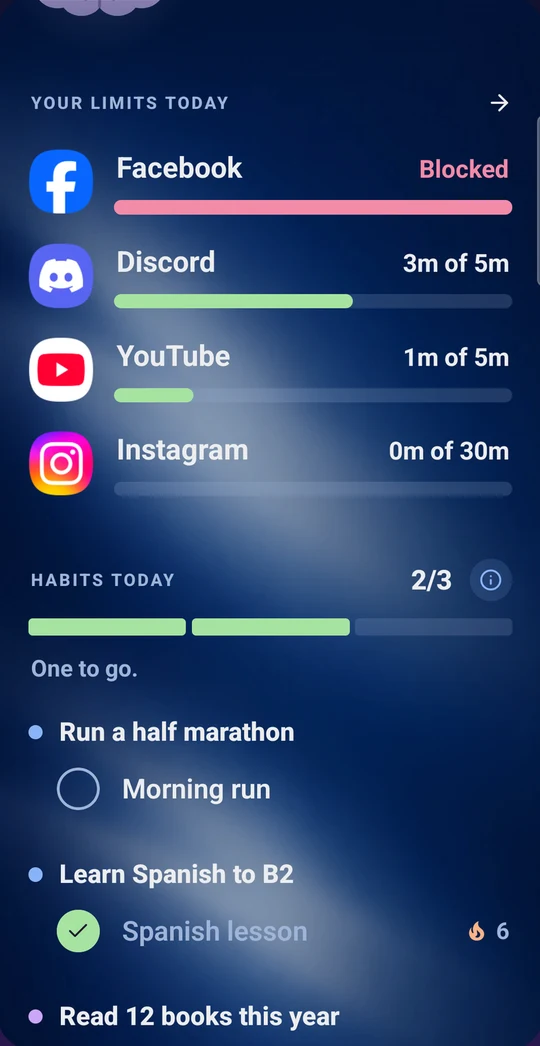
Three steps, a minute to set up
Pick the apps
The ones that take your time, picked from the apps you actually use most.
Set a limit
Your own daily limit for each app you add, or block it completely.
Time's up
The app closes, and the goal you put first is right there instead.
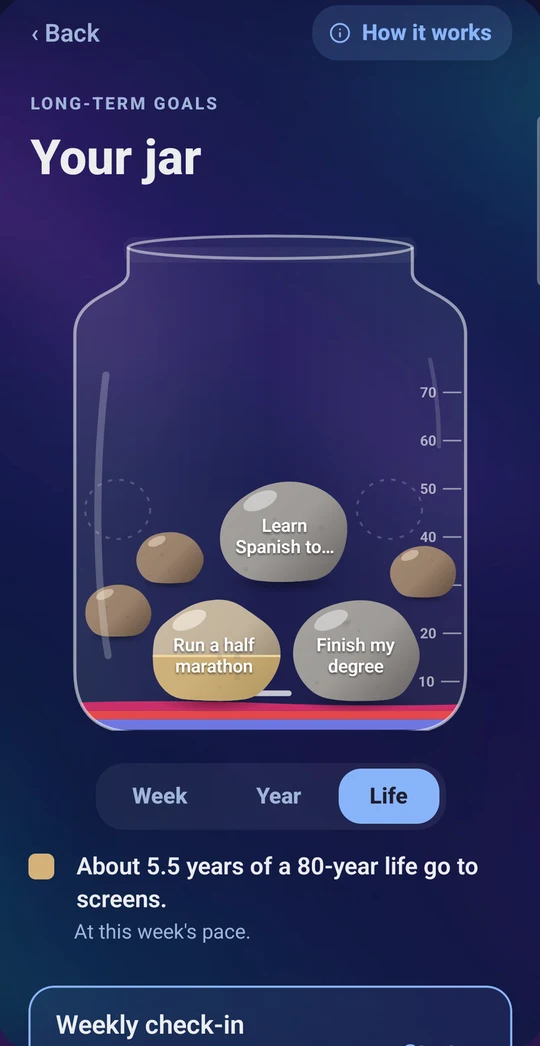
Not only less scrolling. More of what matters.
Put your big goals in the jar and build small daily habits toward them. Every block points you back to them, and your week shows where your time really went.
What leaves your phone
Only the time on the apps on your list, like this:
Instagram · 42 min · Tuesday
Never your messages, photos, what you type or what you watch. No ads, never sold. Delete all of it any time.
One limit, everywhere
Phone · the Android app and its home-screen widget
Browser · the extension for Chrome, Edge and Brave
Computer · the Windows app
Time on your phone, browser and computer counts toward the same limit.
Free for up to 3 apps
A daily limit or a block for up to 3 apps, up to 3 habits and 3 goals, and your week, free. Premium removes the caps and adds different days, times of day like "only in the evening", weekly limits and your full history.